Building a 2.5Gbps Home Router with NixOS
TL;DR: Built a NixOS-based router on a $150 Intel N5105 mini PC that handles 2.5Gbps fiber with advanced QoS, monitoring, and declarative configuration. After experiences with pfSense and OPNsense, NixOS with comprehensive testing provides the control and reliability I was seeking. Check out the full router configuration.
Motivation
Consumer routers work fine for most people. They’re reliable, easy to set up, and just work. But if you’re reading this, you’re probably not “most people.”
For me, the limitation wasn’t about failures or frustration - it was about curiosity. I wanted to:
- See real traffic data, not just pretty graphs
- Add custom DNS rules for my homelab
- Experiment with different QoS algorithms
- Actually understand what my network was doing
Consumer routers are black boxes. Even the “advanced” settings are usually just basic toggles. Want to try a different packet scheduler? Add custom monitoring? Write your own firewall rules? Good luck with that.
Evolution of My Router Setup
First Attempt with NixOS
Three years ago, I discovered NixOS and was attracted to its declarative configuration approach. Version control for system configuration seemed ideal for a router.
The concept was appealing:
networking.firewall = {
  enable = true;
  # Just declare what I want!
};
However, I encountered challenges with UPnP implementation. Gaming consoles reported strict NAT types, and port forwarding proved difficult to configure properly. After multiple connectivity issues, I decided to switch to a more established solution.
Experience with pfSense
pfSense provided a stable solution with its web UI, extensive package ecosystem, and strong community support. It served reliably for several years.
However, a configuration corruption incident after an update highlighted a critical limitation: without declarative configuration or version control, recovering the exact router state required manual reconstruction from memory.
Transition to OPNsense
Following the pfSense incident, I migrated to OPNsense. It’s well-engineered software with good stability and maintenance.
While functional, the GUI-based configuration lacked the version control and reproducibility benefits of declarative systems. The contrast with Infrastructure as Code principles was apparent.
Return to NixOS with Better Tooling
In 2025, with improved tooling including AI coding assistants, I revisited NixOS for routing. The key difference was developing a comprehensive test suite.
The test coverage includes:
- Basic connectivity validation
- DNS resolution verification
- Firewall rule testing
- UPnP functionality checks
See the complete test suite that validates the entire configuration.
This testing infrastructure enables confident deployment. Changes are validated before reaching production, ensuring network stability.
Why NixOS for a Router?
With proper testing in place, all the NixOS benefits I originally wanted became reality:
Declarative Configuration: My entire router setup is in git. Every firewall rule, every service, every setting - tracked, reviewable, and reproducible.
# This is my actual DNS configuration
services.blocky = {
  enable = true;
  settings = {
    upstream.default = [
      "1.1.1.1"
      "8.8.8.8"
    ];
    blocking.blackLists = {
      ads = ["https://someonewhocares.org/hosts/zero/hosts"];
    };
    customDNS.mapping = {
      "router.lan" = "192.168.10.1";
      "nas.lan" = "192.168.10.10";
    };
  };
};
See the full DNS configuration for complete setup including conditional forwarding for Tailscale.
Atomic Updates: Updates either work completely or roll back. No more half-applied configs that break networking.
Reproducible Builds: I can build the exact same router configuration on a test VM, verify it works, then deploy to production.
Test-Driven Development: Comprehensive testing enables reliable changes:
# Simplified example from my test suite
testScript = ''
  router.wait_for_unit("upnp")
  client.succeed("upnpc -a 192.168.10.2 8080 8080 TCP")
  router.succeed("nft list ruleset | grep 8080")
'';
Considerations for Custom Solutions
Important considerations for custom router solutions:
Full responsibility: No vendor support available. Troubleshooting relies on system logs and personal expertise.
Time constraints: Network issues require immediate resolution, especially in households dependent on connectivity.
Maintenance overhead: Security updates, monitoring, and system health are self-managed.
The benefit is complete understanding and control of the network stack. Issues can be diagnosed and features added as needed.
The Final Setup
Here’s what I ended up with:
Hardware: A $150 Intel N5105 mini PC from AliExpress
- 4-core Celeron with AES-NI (plenty for routing)
- 4x Intel I226-V 2.5GbE NICs
- 8GB RAM, 16GB NVMe
- Fanless, ~15W power draw
- Standard x86 architecture for broad compatibility
Software Stack:
- NixOS for the base system
- nftables for firewall
- Blocky for DNS with ad blocking
- miniupnpd for UPnP/NAT-PMP
- CAKE for QoS and bufferbloat mitigation
- Prometheus + Grafana for monitoring
- Tailscale for remote access
Performance:
- 2.5Gbps symmetric with <1ms added latency
- Full IDS/IPS at line rate
- 50+ days uptime (only reboots for kernel updates)
Monitoring Dashboard
With Prometheus and Grafana, I have complete visibility into my network’s performance:
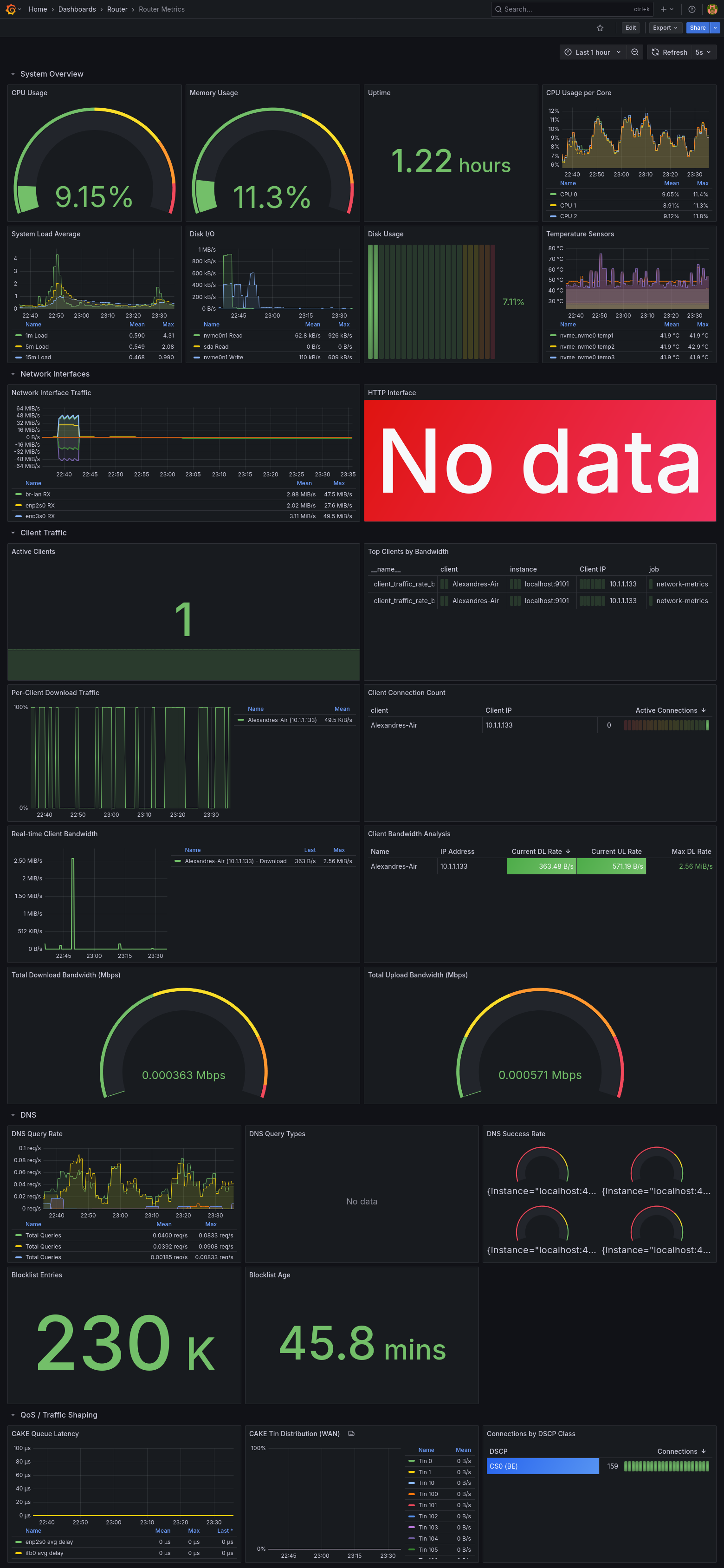
The dashboard shows real-time metrics including CPU usage, memory utilization, disk I/O, network traffic per interface, DNS query statistics, client bandwidth analysis, and QoS performance metrics.
What’s Next?
If you’re interested in building your own NixOS router, I’ve created a tutorial series that walks you through the process:
- Part 1: Getting Started - Hardware selection, basic installation, and minimal router configuration
- Part 2: Testing Your Configuration - Write comprehensive tests to ensure reliability
- Part 3: Per-Client Monitoring - Track bandwidth usage per device with Prometheus and Grafana
The full configuration demonstrates many advanced features including comprehensive testing, network architecture with bridging and VLANs, DNS with ad blocking, QoS with CAKE for bufferbloat mitigation, monitoring with Prometheus and Grafana, VPN integration, and dynamic port forwarding.
The full configuration is available on GitHub. The main configuration file ties everything together. For details on how I manage NixOS across multiple hosts in my homelab, see my post on Managing a Homelab with NixOS.
Conclusion
Building a custom router with NixOS requires significant technical investment. For my use case, the benefits of declarative configuration, comprehensive testing, and complete control justify the effort.
The combination of nixos-rebuild switch with passing tests provides confidence in network changes that GUI-based solutions cannot match.